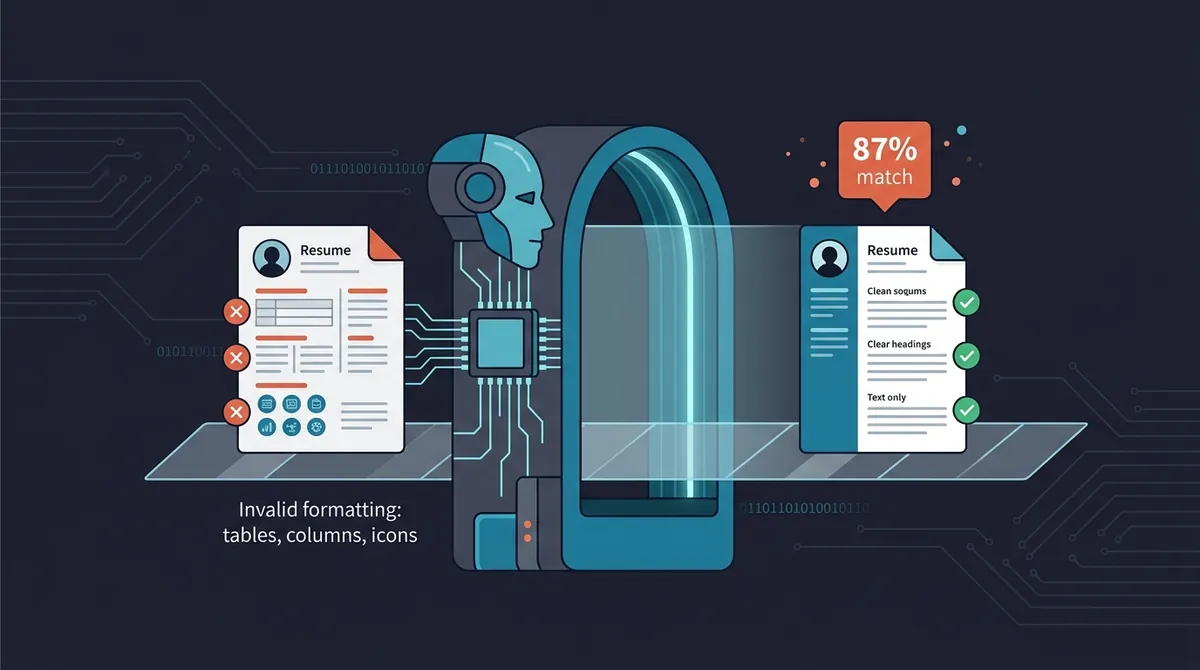
Here's a statistic that should change how you think about your resume: approximately 75% of resumes submitted to mid-to-large companies never reach a human reader. They're rejected automatically, by software.
Applicant Tracking Systems (ATS) sit between your application and the recruiter's inbox. They parse your resume, score it against the job description, and rank candidates. In many cases, they filter automatically before any human reviews the pile.
This guide explains exactly how ATS systems work and gives you a practical checklist to ensure your resume gets through.
What Is an ATS and How Does It Work?
An Applicant Tracking System is software that manages the recruiting process, from receiving applications to scheduling interviews. The parsing and scoring functions are what affect you as a candidate.
The four things ATS does to your resume
1. Parse: The system extracts text from your file and attempts to classify it, identifying your name, contact info, job titles, employers, dates, education, and skills. This is where formatting problems cause errors: if your layout confuses the parser, your information gets misclassified or lost entirely.
2. Score: The parsed content is compared against the job description. Keywords, job titles, skills, and years of experience all factor into a match score.
3. Rank: All candidates for a role are ordered by match score. The recruiter typically sees the highest-ranked candidates first.
4. Filter: Some systems automatically exclude candidates below a threshold score before any human reviews the application.
The major ATS platforms
The most widely used systems, Workday, Greenhouse, Lever, iCIMS, Taleo, Ashby, each have different parsing behaviors and scoring methodologies. Optimizing your resume for the common denominator (clean formatting + strong keyword coverage) is more practical than trying to reverse-engineer each platform.
ATS Myths That Are Costing You Applications
Myth: White text keyword stuffing works. This was a trick from 2012. Modern ATS systems can detect text that matches the background color, and it can flag your application as manipulative. Don't do it.
Myth: A creative design will impress the recruiter. A creative design might impress a human, but only after it clears the ATS. Multi-column layouts, graphics, and decorative elements frequently confuse parsers. Your beautifully designed resume may arrive as garbled text.
Myth: ATS only looks at keywords. Structure matters. If your section headings aren't recognizable, the ATS may misclassify your work experience as "education" or vice versa. Formatting quality directly affects parse accuracy.
Myth: Passing ATS means you'll get an interview. ATS optimization gets you through the first gate. You still need a resume that a human finds compelling. Both matter.
Formatting Rules That Every ATS Can Parse
This is the most important section if you've been getting no responses despite feeling qualified.
File format
- Submit as .docx or .pdf. Most modern ATS handle both. Check the job posting, if it specifies a format, use it.
- Never submit: .pages files, a photo/screenshot of your resume, or a Google Docs link (unless specifically requested).
Layout
- Single column. Two-column layouts are the most common formatting mistake. ATS systems typically read left-to-right and merge columns. Your carefully organized content becomes a jumbled paragraph.
- No text boxes. Text inside floating boxes is often invisible to parsers.
- No tables. Same issue. Content in table cells is frequently missed.
- No headers or footers for contact info. Many ATS systems don't parse the header/footer area of a Word document. Put your name, email, phone, and LinkedIn in the main body.
- No graphics, icons, or logos. These are invisible to ATS and reduce the signal-to-noise ratio.
Typography
- Standard fonts only: Arial, Calibri, Garamond, Georgia, Times New Roman, Helvetica.
- Body text: 10–12pt. Name: 14–16pt.
- No colored text beyond black or dark gray. Some ATS systems ignore light-colored text.
Section headings
Use expected, standard labels:
- "Work Experience" or "Professional Experience", not "Career Story" or "Where I've Been"
- "Education", not "Academic Background"
- "Skills", not "What I Bring to the Table"
- "Summary" or "Professional Summary", not "About Me"
The ATS needs to recognize the section to classify its contents correctly.
Keyword Optimization Strategy
Step 1: Extract keywords from the job description
Read the job description carefully and identify:
- Skills mentioned more than once (high-priority keywords)
- Specific tool and software names (exact match matters, "Salesforce" not "CRM platform")
- The job title itself (if you've held it or a close equivalent)
- Soft skills repeated across the description ("cross-functional collaboration" appearing three times is a signal)
- Industry-specific terminology (jargon that signals domain expertise)
Aim to identify 8–12 priority keywords before writing a single word of your tailored resume.
Step 2: Map keywords to your experience
Go through your extracted keywords and match each one to where in your experience it genuinely applies. Some will appear multiple times, in your summary, in a skill bullet, and in a job description. That repetition is intentional and appropriate.
For keywords you can honestly claim but haven't been listing, add them. You're not fabricating; you're surfacing what you actually know.
Step 3: Placement strategy
Professional summary: Include 2–3 top keywords naturally in 3–4 sentences. This section is scanned early and heavily.
Skills section: Your most keyword-dense section. List tools, technologies, methodologies, and relevant competencies. Be specific: "Python, SQL, Tableau" rather than "data analysis tools."
Work experience bullets: Weave in keywords where they honestly apply. Don't force them, if a keyword fits, use it; if it doesn't, skip it.
Education and certifications: Use exact certification names as they appear in the job description. "Certified Scrum Master (CSM)" may score differently than "Scrum Certified."
Step 4: Handle acronyms both ways
Write out both the full term and its abbreviation the first time: "Search Engine Optimization (SEO)." ATS systems search for the specific string, covering both forms ensures you match either.
Optimizing Each Resume Section
Contact information
Include: full name, city and state (full address not necessary), phone number, professional email, and a customized LinkedIn URL (linkedin.com/in/yourfirstlastname).
Place this at the very top of the document body, not in a header/footer element.
Professional summary
3–4 sentences. Not an objective statement ("seeking a challenging role"). A summary of who you are and what you bring.
Formula: [Targeting job title] with [X years] of experience in [domain]. Known for [top 1-2 strengths or results]. Seeking to [specific goal in the target role].
Include the exact job title you're targeting if you've held it or something closely equivalent.
Work experience
- Reverse chronological order (most recent first), ATS weighs recency
- For each role: company name, your title, month and year dates, city/state
- 4–6 bullets per role (2–3 for older roles)
- Bullet format: start with an action verb, include a specific result or metric, include a relevant keyword
- Move your most relevant bullets to the top of each role's list
Skills section
- List specific tools, technologies, and methodologies, not vague categories
- Match the exact phrasing used in the job description where possible
- Group logically if you have many skills: "Analytics: SQL, Python, Tableau, Google Analytics"
- Don't pad with obvious items (Microsoft Word for a software engineering role adds noise)
Testing Your Resume Before You Submit
The copy-paste test
Copy all the text from your resume and paste it into a plain text editor (Notepad on Windows, TextEdit in plain text mode on Mac). If it reads coherently in sequence, name, contact info, summary, experience in order, the ATS will likely parse it correctly. If it's scrambled or missing sections, you have a formatting problem.
ATS checker tools
Free tools like Jobscan and Resume Worded let you upload your resume and paste a job description to see your keyword match percentage and identify specific gaps. The scores aren't a guarantee, but they surface obvious mismatches.
The 6-second human test
After passing the ATS formatting check, show your resume to someone for exactly 6 seconds and ask them two questions: "What job am I targeting?" and "What's my strongest skill?" If they can't answer both, your human-readable signal needs work. You're optimizing for two audiences: the machine and the person who reads what gets through.
ATS Optimization Checklist
Before submitting any application, run through this:
- Single-column layout with no tables or text boxes
- Contact info in document body (not header/footer)
- Standard section headings
- Standard font, 10–12pt body text
- Submitted as .docx or .pdf per job posting instructions
- Top 5 keywords from JD appear at least once on the resume
- Exact tool names from JD included (not just category names)
- Professional summary includes the target job title and top 2 keywords
- Skills section reordered to match JD priorities
- Acronyms written out in full the first time
- Passed the copy-paste test
Once your content is optimized, consider managing multiple resume versions for different role types.
The Bottom Line
ATS optimization is not about tricking a machine. It's about making sure the work you put into your resume actually gets seen. Clean formatting ensures accurate parsing. Strategic keyword placement ensures a competitive score. Together, they get you out of the automated filter and into a human's inbox.
From there, it's on you to be the compelling candidate. But you can't be compelling if you never get read.