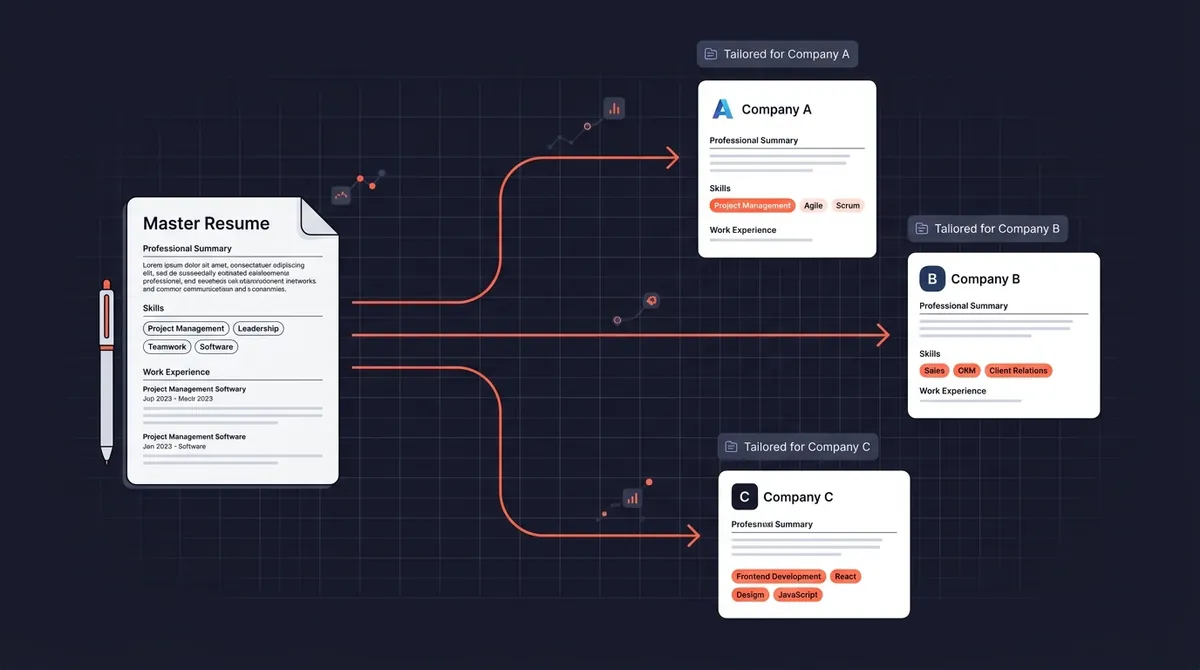
"You should tailor your resume for every job." You've heard this advice a hundred times. What you haven't heard is a realistic system for doing it without spending three hours per application.
Here's the truth: resume tailoring does not mean rewriting your resume from scratch each time. It means making targeted changes to specific sections, 15 to 20 minutes of work that significantly improves your ATS score and catches the recruiter's eye in the first 6-second scan.
This guide gives you the exact system.
Why Tailoring Actually Works
Two concrete mechanisms make tailored resumes outperform generic ones:
ATS keyword matching. Applicant Tracking Systems score your resume against the job description by comparing keyword overlap. A resume with 30% keyword match gets ranked lower than one with 70%. Your generic resume might cover most keywords weakly, a tailored one concentrates the right keywords in the right places.
The recruiter's 6-second scan. Eye-tracking research shows recruiters spend most of their initial attention on the top third of a resume, your summary and the most recent job. A generic summary that tries to appeal to everyone appeals to no one. A tailored summary that mirrors the job title and top requirements creates an immediate "this is the right candidate" signal.
The math is simple: 30 tailored applications outperform 100 generic ones in most job markets.
Step 1: Build Your Master Resume (Do This Once)
The reason tailoring feels overwhelming is that most people start with their current resume, which is already compressed. When you need to add new content, it feels like a rewrite.
The solution is a master resume.
What a master resume is: A comprehensive, unsent document containing every piece of experience, skill, and achievement you might ever use. It's long (5–8 pages is fine), it's not designed to be read by recruiters, and you'll never submit it. It's your private source material.
What to include:
- Every job you've held, with 6–10 bullet points per role (including bullets you've cut for space in the past)
- Multiple bullet variants for key roles: one results-focused, one scope-focused, one skills-focused
- Every skill you actually use, including ones you haven't thought to list
- All certifications, courses, and credentials
- Side projects, volunteer work, speaking engagements
- A "skills inventory" section: technical tools, methodologies, soft skills
How to build it: Start with your current resume and spend 90 minutes expanding it. Add every bullet you've ever deleted for space. Write the 2–3 variants for your most recent and most relevant role. Add skills you've been leaving off.
Once you have this, tailoring becomes a matter of selection and minor customization, not creation.
Step 2: Extract Keywords from the Job Description (5 Minutes)
Open the job description and read it with a highlighter mindset. You're looking for:
Required skills mentioned multiple times. If "data analysis" appears in the requirements, the responsibilities section, and the nice-to-haves. It's a priority keyword.
Specific tools and technologies. Exact names matter. "HubSpot" scores differently than "CRM software." "Python" is different from "programming languages."
The job title itself. If they're hiring a "Senior Growth Manager" and you've been calling yourself a "Growth Lead", consider mirroring their language.
Soft skills emphasized repeatedly. "Cross-functional collaboration" appearing three times signals that team dynamics are important to this hiring manager.
After your first read-through, you should have 8–12 highlighted keywords. Rank them by importance: how often they appear and whether they're in the "required" vs. "preferred" section.
Step 3: Customize the Top Third of Your Resume (10 Minutes)
This is where most of the tailoring impact comes from. The bottom two-thirds of your resume, older roles, education, minor skills, can stay largely the same.
The professional summary (3–5 minutes): Rewrite this for every application. Use the job title they're hiring for (if you've held it or a similar one). Mirror the top 2–3 keywords. Make it specific to what they're looking for, not a general career statement.
Generic: "Experienced marketing professional seeking a challenging role in a dynamic environment."
Tailored: "Growth Marketer with 5 years of experience scaling B2B SaaS companies from seed to Series B. Specialized in demand generation and product-led growth. Seeking to bring a data-driven acquisition strategy to [Company]'s next growth phase."
The most recent job's top bullets (5 minutes): Pull the 2–3 most relevant bullets from your master resume for this role. Move them to the top of the bullet list for that job. These should be the bullets that best match the keywords you extracted.
The skills section: Reorder your skills to front-load what the job description emphasizes. Add any specific tools from the JD that you have genuine experience with.
Step 4: The Final Keyword Check (2 Minutes)
Before saving, do a quick scan:
- Does the job title appear in your summary or experience (if you've held it)?
- Do the top 5 keywords from your extraction appear at least once?
- Does your most recent role's first bullet reflect the core requirement?
You're not looking for keyword stuffing. You're checking for gaps. If "Salesforce" is in the JD three times and isn't anywhere on your resume despite you using it daily, that's a quick addition.
Save as: [CompanyName]_[JobTitle]_[YourName].pdf
What to Actually Change vs. What to Leave Alone
Always customize:
- Professional summary
- Top 3–4 bullets of your most recent relevant role
- Skills section order
- Any project or certification section (reorder by relevance to this role)
Usually leave alone:
- Job history dates, company names, titles
- Most bullets in older roles
- Education section (unless the JD calls out specific degrees or certifications)
- Contact information
Never do:
- Fabricate experience or skills you don't have
- Copy-paste from the job description verbatim, ATS systems now flag this
- Use "white text" keyword stuffing. This trick is 10 years old and ATS catches it
The 3-Tier Resume System
Rather than creating a unique resume for every single application, most experienced job seekers operate with 3–5 "base versions" targeting different role types:
Tier 1 bases (by role type): One resume for Product Management roles, one for Operations roles, one for leadership roles. Each has a different summary, different skills emphasis, and different bullet ordering.
Tier 2 customization: 15 minutes of work on top of the relevant base, adding keywords from the specific JD, adjusting the summary to name the company and role, surfacing the most relevant bullets.
This system scales. Instead of an hour per application, you spend 15–20 minutes. The quality is higher than a generic resume, and you can sustain it across 10–20 applications per week.
Tracking Which Version Went Where
This is the step most people skip, and it's the one that creates chaos later.
When you get an interview invitation, the recruiter is looking at the version you submitted. If you've sent 30 tailored resumes, which one did they get? Without a record, you're guessing.
Simple system: Log the resume filename alongside every application. In your job tracker, whether a spreadsheet or a tool like OfferFlow, add a "Resume Version" field and fill it in the moment you apply.
Before every interview, open the specific version they received. Your talking points should match what's on that document.
ATS Formatting Rules (Don't Skip This)
Your tailored content will never be seen if the ATS can't parse the file. Quick checklist:
- Single-column layout (two-column layouts often get merged into unreadable text)
- No tables, text boxes, or graphics
- Standard section headings: "Experience," "Education," "Skills", not creative alternatives
- Standard fonts: Arial, Calibri, Georgia, Times New Roman
- Submit as .docx or .pdf, check the application portal's preference
- Contact info in the body of the document, not in the header/footer
How Long Should Tailoring Take?
With the master resume built and your base templates set up:
- First tailoring from a new base: 45–60 minutes (you're building the template)
- Customizing an existing base: 15–20 minutes
- Minor keyword adjustments to a base: 10 minutes
If you're spending 2 hours per application on tailoring, you're over-engineering it. The law of diminishing returns kicks in fast. The difference between a well-tailored resume and a perfectly tailored resume is not worth 90 extra minutes.
Getting Started
- Set aside 90 minutes this week to build your master resume
- Create 2–3 base resume versions for your primary target role types
- Pick your next 5 applications and practice the 4-step tailoring process
- Log the resume version sent for each application
The job seekers who get the most interviews aren't necessarily the most qualified. They're the ones whose resumes most clearly match what the hiring manager is looking for. Tailoring is how you make that match visible.