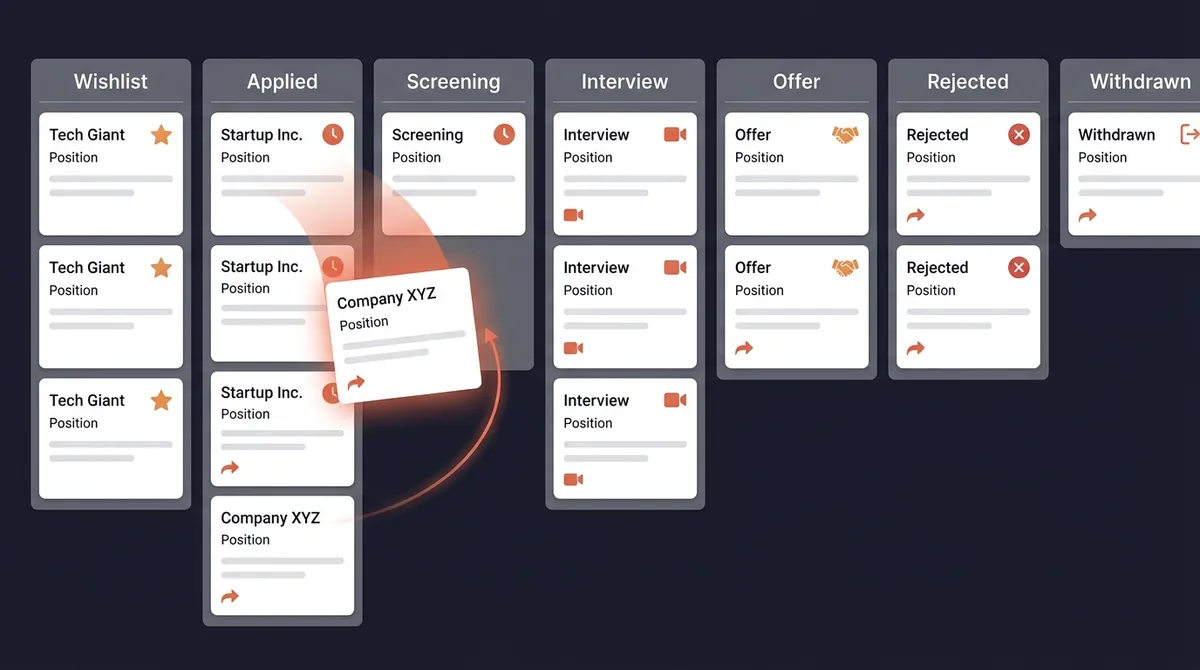
Most job seekers manage their search with a spreadsheet, a mental list, or, more often than they'd admit, nothing at all. Applications pile up. Statuses blur. Follow-up dates slip by. The whole process feels like controlled chaos.
A kanban board changes this. Instead of scrolling through rows in a spreadsheet trying to remember where things stand, you see your entire job search pipeline at a glance. Every application, every stage, every opportunity that needs action today.
This tutorial walks you through setting it up and using it daily.
What Is a Kanban Board?
Kanban originated in Toyota's manufacturing system as a way to visualize work in progress and identify bottlenecks. Software teams adopted it (you may know it from Jira or Trello). For job seekers, the same principles apply remarkably well.
The concept is simple:
- Cards represent individual items, in your case, each job application
- Columns represent stages, the phases of your application process
- Movement shows progress. You drag a card from "Applied" to "Screening" when a recruiter reaches out
The visual format is the key difference from a spreadsheet. A spreadsheet shows you a list. A kanban board shows you a pipeline, where everything is, what's moving, and what's stuck.
Why Kanban Beats a Spreadsheet for Job Searching
Spreadsheets are good for data storage. Kanban boards are good for workflow management. Job searching is a workflow.
Here's the practical difference: imagine you have 30 open applications. In a spreadsheet, all 30 look the same, rows of text, one cell per status. You have to read each row to understand where it stands.
In a kanban board, you see immediately that 25 cards are sitting in "Applied," 4 are in "Screening," and 1 is in "Interview." That picture tells you something: your application-to-response rate is about 17%. If all 25 "Applied" cards have been sitting there for 3+ weeks, you have a follow-up backlog and possibly a resume issue.
Pattern recognition requires visual data. Kanban provides it.
The Job Search Kanban Columns
Here's the stage structure that works for most job seekers:
Wishlist
Jobs you've identified and want to apply to, but haven't yet. This is your research queue. Before applying to anything, put it here first. It prevents the impulse application to roles you haven't actually evaluated.
Applied
Applications submitted, awaiting any response. The goal is to move cards out of this column regularly. If cards pile up here for weeks, that's a signal.
Screening
A recruiter has reached out. This might be an email asking for availability, an automated scheduling link, or a phone call booked. Anything that indicates a human has seen your application.
Interview
Any formal interview stage, first round, second round, panel, technical assessment. You can use labels or notes to indicate which sub-stage rather than creating a new column for each.
Offer
You've received a formal offer, verbal or written. Cards in this column need decision timelines tracked.
Rejected
You received a formal rejection. Keep these, don't delete them. You need them to calculate your real response rate and identify patterns.
Withdrawn
You removed yourself from consideration. You took another offer, the role changed, or you decided it wasn't right. Same as rejected: keep the card.
What to Put on Each Job Card
The card title should be: Company Name, Job Title
In the card body or description, include:
Essential:
- Application date
- Job board / source where you found it
- Job posting URL and a copy of the job description text (postings expire. You need the text for interview prep)
- Which resume version you sent
- Current status note
Useful:
- Recruiter or contact name + email/LinkedIn
- Salary range from the posting
- Follow-up due date
- Notes from any phone call or email exchange
For advanced tracking:
- Company research notes
- Interviewer names and LinkedIn profiles
- Talking points you prepared
- Offer details when received
The rule: update cards in real time, not in batches. Log the application when you submit it. Update the status the moment you hear anything. A kanban board is only useful if it reflects reality.
Step-by-Step Setup: Three Options
Option A: Trello (Free, 10 Minutes)
- Go to trello.com and create a free account if you don't have one
- Create a new board, name it "Job Search [Year]"
- Create 7 lists: Wishlist, Applied, Screening, Interview, Offer, Rejected, Withdrawn
- Create your first card: click the "+" on the "Wishlist" column, enter a company and role name
- Open the card and add the job description URL, application date, and salary range
- Set a due date for your follow-up (7 days from today if you've already applied)
- Use Trello labels for color-coding: red = follow-up due, green = strong fit, yellow = research needed
Total setup time: 10–15 minutes.
Option B: Notion (More Powerful, More Setup)
Notion's database feature lets you build a kanban view with custom properties. More powerful than Trello, but requires more configuration.
- Create a new page, add a database block, set the view to "Board"
- Configure properties: Status (select), Company, Role, Applied Date, Source, Salary, Contact, Resume Version
- Set up the Status property with your 7 pipeline stages as options
- Create a filtered "Active Pipeline" view that excludes Rejected and Withdrawn cards
- Create a filtered "Follow-Up Due This Week" view filtered by your follow-up date property
Setup time: 45–60 minutes. Worth it if you already live in Notion.
Option C: OfferFlow (Built for Job Search, No Setup)
OfferFlow is a job search platform with a kanban pipeline built in. The stages are pre-configured for a job search workflow, contacts and documents are integrated, and there's a Chrome extension that captures jobs from any job board in one click.
If you don't want to spend an hour configuring a general-purpose tool, this is the fastest path from zero to functional pipeline. Free plan available.
The Daily 10-Minute Review
A kanban board is only valuable if you look at it regularly. The daily review keeps everything current and ensures nothing falls through.
Morning (5 minutes):
- Open your board. Do a visual scan of all columns
- Check for any follow-up dates that are today or past-due (red labels if you're using them)
- Look for anything that needs a status update. Did you hear from anyone yesterday?
- Set one concrete job search goal for today
After each application (2 minutes): Log it immediately. Not at the end of the day. Create the card, add the description text, set the follow-up date.
End of day (3 minutes):
- Update any statuses that changed
- Move cards that progressed
- Archive cards where you've received and logged rejections
That's it. 10 minutes total keeps your board accurate and your search on track.
The Weekly Kanban Review
Every Sunday, spend 20 minutes reviewing your board at a higher level:
Count cards in each column. How many are in Applied? How many have moved to Screening or beyond? Calculate your response rate: (Screening + Interview + Offer) / Applied. If it's below 10% after 30+ apps, that's a resume or targeting problem.
Check for stale cards. Applied 3+ weeks ago with no movement, either follow up or archive. Letting stale cards clutter your board creates noise.
Assess pipeline health. Is your Wishlist column growing? If it's empty, you'll run out of applications to send next week. Is Screening growing but Interview stagnant? That's a different problem.
Archive what's done. Move Rejected and Withdrawn cards to an archived state periodically. Keeping the active pipeline clean reduces visual clutter and cognitive load.
Reading Your Pipeline for Insights
The most underused feature of a kanban system is using it to improve your search strategy.
Lots of cards stuck in Applied, few in Screening: Response rate is low. Examine whether your resume is ATS-optimized, whether you're tailoring for each role, and whether your follow-up process is working.
Good screening rate but poor interview conversion: You're getting calls but not converting. Look at your phone screen performance. Are you clear on your narrative? Are you applying to roles where you meet 70–80% of requirements?
Good interview rate but no offers: Interview technique or role targeting. Are you getting to final rounds? Where are you losing?
Everything moving but slowly: Volume issue. You need more cards entering the top of the funnel.
Each bottleneck has a different fix. The kanban board makes the bottleneck visible so you know where to focus your energy.
One Final Note on Tools
The best kanban board is the one you'll actually use. If you already use Notion daily, set it up there. If you want to start in the next 10 minutes with zero configuration, use Trello or OfferFlow.
What matters isn't which tool you choose. It's that you commit to keeping it updated. A slightly imperfect board you use consistently produces better results than the perfect board you set up once and never touch again.
Start today. Add your three most recent applications. Set follow-up dates. That's the whole system, working.